Features / AI assistant (MCP)
An MCP server that connects your AI assistant to your vocabulary
Nightspar has a built-in MCP server. Connect it once, and the assistant you already chat with can save words into your library mid-conversation — and read back what you have saved.
How does saving from an AI chat work?
MCP — Model Context Protocol — is the standard AI assistants use to talk to outside tools. Any MCP-capable assistant can connect to Nightspar: Claude, ChatGPT, Claude Code, Cursor.
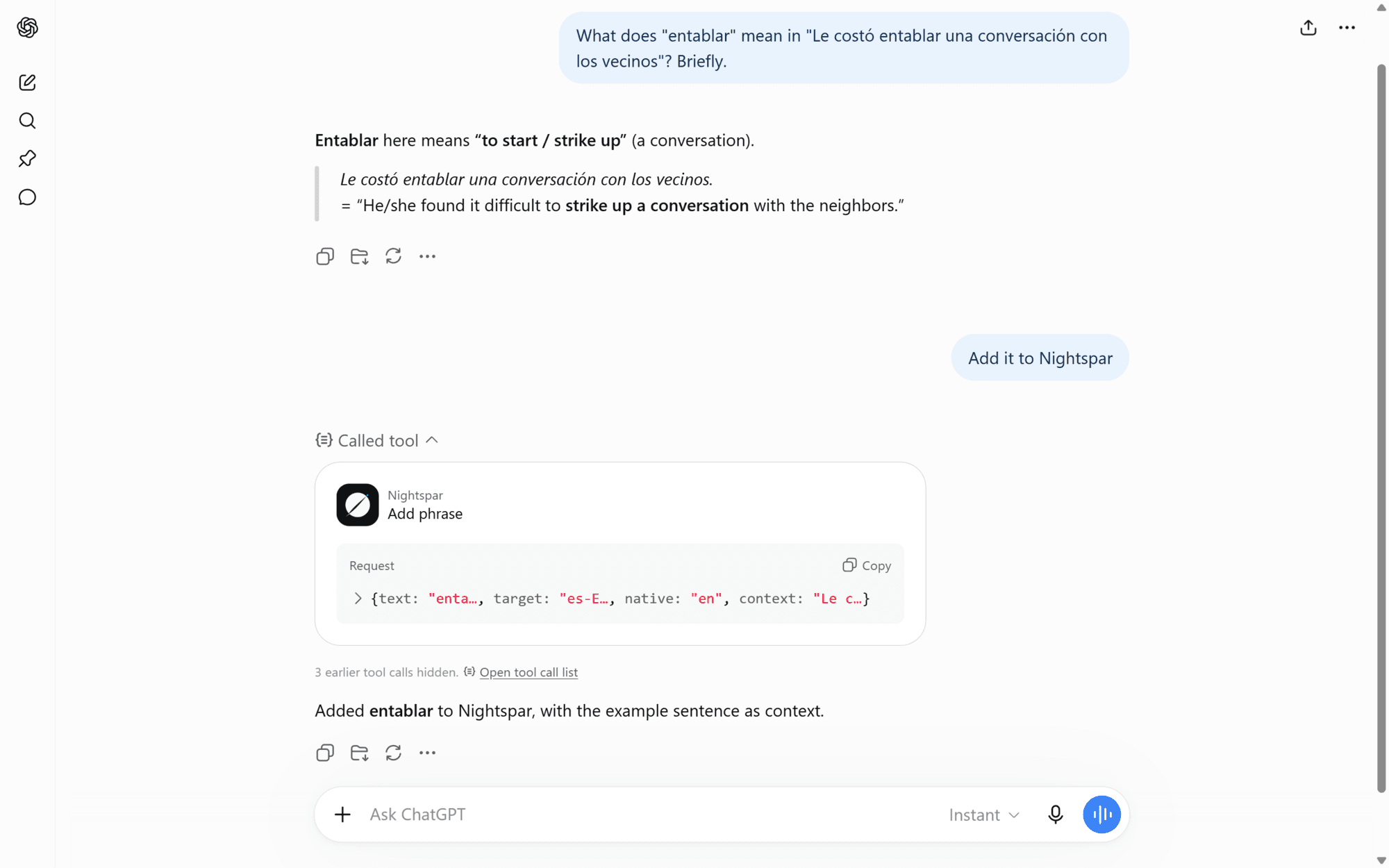
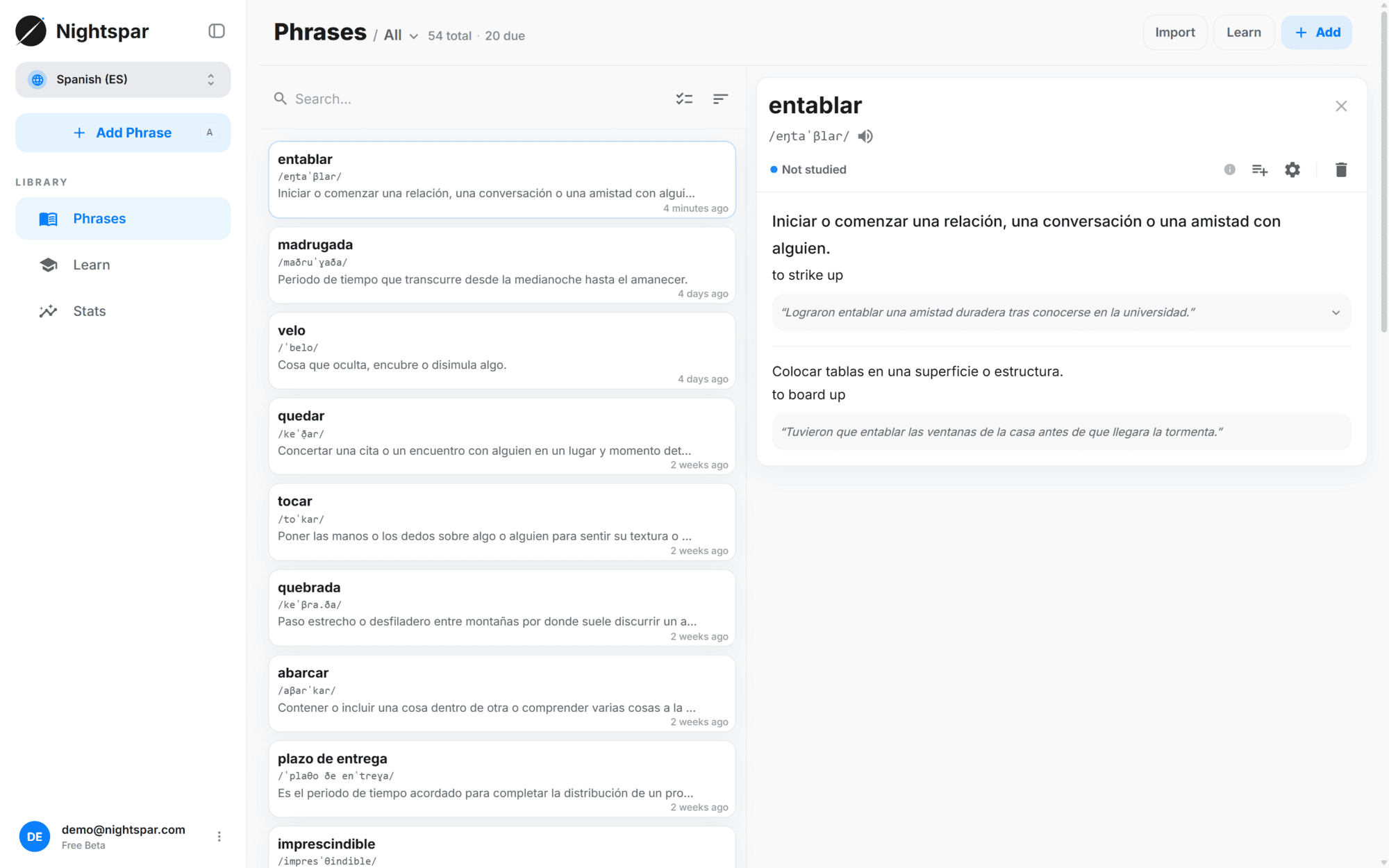
The usual moment looks like this. You ask what a word in a sentence means, the assistant explains it, and you say "add it to Nightspar". The phrase is captured with the context from that conversation, gets the same AI-built card as anything else you save — meanings, translation, pronunciation, examples, audio — and enters your review schedule.
It reads, too. Ask what you saved most recently, search your library from the chat, or ask the assistant to build its explanations around vocabulary you already have.
Connect once
Paste your connector URL into your assistant and sign in with your Nightspar account.
Chat as usual
Ask about words wherever the conversation goes. When one is worth keeping, say so.
It lands in your library
The phrase appears in Nightspar with a finished card and a place in your review queue.
How do I connect my assistant?
Setup is one time. Open "Use in AI chats" from your user menu — or the card of the same name in the sidebar — and copy your connector URL. It points at https://api.nightspar.com/mcp.
In Claude on web or desktop: Settings, then Connectors, then Add custom connector, and paste the URL. In ChatGPT: Settings, then Connectors, with developer mode turned on. In Claude Code, one command does it: claude mcp add --transport http nightspar https://api.nightspar.com/mcp
A browser window then asks you to sign in to your Nightspar account. That is the whole setup — no API keys, no tokens to paste. Authorization is standard OAuth, tied to your account, and your password is never handed to the assistant. Remove the connector on the assistant side and its access goes with it.
Support varies by client and by plan. Some assistants allow custom connectors only on paid tiers, or behind a developer setting you have to enable first, and the sign-in step needs a client that supports remote MCP servers with OAuth. If your assistant lists no custom connectors anywhere, it cannot connect yet.
The same card as every other save
A phrase saved from a chat runs through the identical pipeline as one clipped from a webpage or typed into the app. Meanings, translations, IPA, example sentences and audio are built for you, and the card joins your FSRS queue with everything else.
Your collections are readable by the assistant too, so it can answer questions about what a collection already holds before you add anything else to it.
Common questions
Which assistants work?
Any client that supports remote MCP servers with OAuth sign-in — Claude on web and desktop, ChatGPT with developer mode enabled, Claude Code, Cursor. Whether custom connectors are available to you also depends on your plan with that assistant; several vendors keep them on paid tiers.
Is it safe? What can the assistant access?
It acts as you, on your vocabulary and collections, and nothing beyond that. Access comes from an OAuth sign-in rather than a password, it can read and add but never delete, and removing the connector in your assistant takes the access away.
Do words saved from a chat get the same flashcards?
Yes — the same pipeline as every other save. Meanings, translations, pronunciation, examples and audio are generated, and the card enters your review schedule.
Does it cost extra?
No. The MCP server is part of Nightspar. What your assistant charges for custom connectors is between you and that vendor.